
AI music generation tools have democratized music creation, putting capabilities once reserved for professional composers and expensive production studios into the hands of content creators, marketers, and small businesses. If you have ever struggled to find the perfect background music for your YouTube video, podcast, or social media content without breaking copyright laws or draining your budget, this guide changes everything.
The landscape of music production has undergone a remarkable transformation. What previously required musical training, expensive software, and hours of composition now happens in minutes through intelligent platforms that understand music theory, emotional resonance, and genre conventions. These tools do not just randomly combine notes. They analyze your content, understand the mood you want to convey, and generate original, royalty-free tracks tailored to your specific needs.
This comprehensive evaluation examines seven platforms leading the AI music revolution in 2026. Each has been tested across real content creation scenarios—from YouTube channels to corporate presentations—revealing which tools produce professional-quality music and which generate forgettable noise.
- The Content Creator’s Music Dilemma
- Understanding AI Music Generation Technology
- Soundraw: Customizable AI Music for Video Creators
- AIVA: Classical Training Meets Artificial Intelligence
- Amper Music (Now Shutterstock): Enterprise-Grade Audio
- Mubert: Infinite Streaming Music for Digital Content
- Ecrett Music: Scene-Based Composition Made Simple
- Boomy: Instant Song Creation for Non-Musicians
- Soundful: Studio-Quality Tracks in Minutes
- Comparative Analysis: Choosing Your Platform
- Legal Considerations: Royalty-Free vs. Copyright-Free
- Implementation Strategy: From Concept to Published Track
- Common Mistakes That Undermine Audio Quality
- The Future of AI-Generated Music
- Frequently Asked Questions
The Content Creator’s Music Dilemma
Content creators face a persistent challenge: finding high-quality music that enhances their message without creating legal risks or financial strain. Traditional solutions fall into three categories, each with significant drawbacks.
Stock Music Libraries Platforms like AudioJungle and PremiumBeat offer licensed tracks, but costs add up quickly. A single track might cost $20-100, and you need different music for different projects. For creators publishing weekly content, annual music budgets can exceed $1,000-2,000.
Copyright Risks Using popular music without permission leads to demonetization, content takedowns, and potential legal action. YouTube’s Content ID system automatically detects copyrighted material, making unauthorized use increasingly risky.
Hiring Composers Custom music from professional composers delivers quality but costs $500-5,000 per track—prohibitive for most independent creators and small businesses.
AI music generation tools solve this trilemma by providing:
- Unlimited original music at a fraction of traditional costs
- Complete royalty-free licensing for commercial use
- Customization options matching music to content mood and pacing
- Instant generation without waiting for human composers
- Consistent quality across unlimited tracks
The technology has matured from producing robotic, repetitive loops to generating emotionally resonant compositions that rival human-created music. Modern platforms understand genre conventions, instrumental arrangements, and how music supports visual storytelling.
Understanding AI Music Generation Technology
Not every platform labeled “AI-powered” delivers genuine musical intelligence. Understanding the technology helps you choose tools that produce quality results.
How AI Music Generation Works:
Modern AI music generation tools use machine learning models trained on vast datasets of music across genres, eras, and styles. These systems learn:
- Musical structure: How songs are organized (intro, verse, chorus, bridge, outro)
- Harmony and melody: Which notes sound good together and create emotional impact
- Rhythm and tempo: How beats and timing affect energy and mood
- Instrumentation: Which instruments work together in different genres
- Genre conventions: What makes jazz sound like jazz, or electronic music sound electronic
Two Primary Approaches:
Pattern-Based Generation The AI analyzes your inputs (mood, genre, tempo) and assembles music from pre-recorded loops and samples. This approach ensures professional sound quality but offers less originality.
Neural Network Composition Deep learning models generate entirely new music note-by-note, creating truly original compositions. This approach offers maximum originality but requires sophisticated models to sound professional.
The best platforms combine both approaches, using neural networks for composition and high-quality samples for instrumentation.
Soundraw: Customizable AI Music for Video Creators
Soundraw has established itself as a leader among AI music generation tools by focusing specifically on the needs of video content creators, offering unprecedented control over music customization.
How It Works:
The platform uses a unique approach: you select mood, genre, and tempo, then Soundraw generates multiple variations. But unlike other tools, you can edit the generated music in detail:
- Adjust individual instrument levels
- Modify song structure (add/remove sections)
- Change tempo without affecting pitch
- Customize intro and outro length
- Create seamless loops for specific video durations
Real-World Application:
Testing Soundraw for a YouTube travel vlog revealed impressive flexibility. The initial generation produced a 3-minute upbeat electronic track. By adjusting instrument levels (reducing drums, increasing synth), modifying the structure (shortening intro, extending chorus), and creating a custom 2:47 loop, the music perfectly matched the video’s pacing and energy.
Strengths:
- Exceptional customization capabilities
- High-quality, professional-sounding output
- Unlimited downloads with subscription
- Commercial use license included
- Intuitive interface requiring no musical knowledge
- Creates seamless loops automatically
Limitations:
- Less suitable for vocal/song creation
- Primarily focused on background/instrumental music
- Requires subscription for commercial use
- Limited genre variety compared to some competitors
Pricing: Free: Limited downloads, personal use only. Creator: $16.99/month (commercial use, unlimited downloads). Pro: $39.99/month (additional features, priority support).
Official Site: https://soundraw.io

AIVA: Classical Training Meets Artificial Intelligence
AIVA (Artificial Intelligence Virtual Artist) occupies a unique position among AI music generation tools by specializing in emotional, cinematic music suitable for films, games, and high-end video production.
The Technology:
Unlike platforms focused on quick background music, AIVA uses advanced deep learning algorithms trained on classical music theory and composition techniques. The system understands:
- Orchestral arrangements
- Emotional progression through music
- Thematic development
- Harmonic complexity
- Dynamic variation
Use Cases:
AIVA excels at creating:
- Film and trailer soundtracks
- Video game scores
- Documentary music
- Corporate presentation soundtracks
- Emotional storytelling accompaniment
Testing Results:
Creating a soundtrack for a short documentary about ocean conservation, AIVA generated a sweeping orchestral piece with strings, piano, and subtle percussion. The music built emotionally, matching the narrative arc from problem to solution. The output quality rivaled music from professional composers, generated in under 10 minutes.
Strengths:
- Exceptional quality for cinematic/orchestral music
- Deep emotional intelligence in compositions
- MIDI file export for further customization
- Professional-grade output
- Strong copyright protection
- Good for long-form content
Limitations:
- Less suitable for pop/electronic genres
- Steeper learning curve than simpler tools
- Higher price point
- Generation slower than loop-based systems
- Requires musical knowledge for advanced editing
Pricing: Free: 3 downloads/month, personal use. Standard: $11/month (commercial use, 15 downloads/month). Pro: $33/month (unlimited downloads, full copyright ownership).
Official Site: https://www.aiva.ai
Related: If you need to coordinate video production schedules and content calendars, explore our guide on AI scheduling tools for automated planning and time management.
Amper Music (Now Shutterstock): Enterprise-Grade Audio
Amper Music, now integrated into Shutterstock’s ecosystem, represents enterprise-level AI music generation tools designed for professional media production companies and large-scale content operations.
Enterprise Features:
The platform offers:
- Custom AI model training on your brand’s audio identity
- API access for integration into production workflows
- Bulk generation capabilities
- Advanced metadata tagging
- Team collaboration features
- Enterprise licensing
How It Works:
You input creative parameters (mood, genre, duration, instrumentation), and Amper’s AI generates original compositions. The system learns from your feedback, improving results over time. The integration with Shutterstock’s massive media library means you can find music, sound effects, and stock footage in one ecosystem.
Professional Application:
A marketing agency producing video ads for multiple clients used Amper to create consistent audio branding across campaigns. By training the AI on each client’s brand guidelines, the agency generated hundreds of unique tracks that maintained brand consistency while avoiding repetition.
Strengths:
- Enterprise-grade quality and reliability
- Custom AI training capabilities
- Seamless Shutterstock integration
- API for workflow automation
- Professional support and SLAs
- Comprehensive licensing
Limitations:
- Expensive for individual creators
- Overkill for simple projects
- Requires technical knowledge for API integration
- Less accessible interface than consumer tools
Pricing: Custom enterprise pricing. Typically starts around $500-1,000/month for business use.
Official Site: https://www.shutterstock.com/music

Mubert: Infinite Streaming Music for Digital Content
Mubert takes a different approach among AI music generation tools by focusing on infinite, adaptive music streams rather than fixed-length tracks, making it ideal for live streams, podcasts, and long-form content.
The Innovation:
Instead of generating a 3-minute song, Mubert creates continuous, ever-changing music that adapts to your needs. The AI analyzes your content type and generates music that:
- Never repeats exactly
- Adjusts energy levels dynamically
- Maintains consistent mood
- Avoids jarring transitions
- Can run for hours without looping
Use Cases:
Mubert excels at:
- Twitch and YouTube live streams
- Podcast background music
- Study/focus music
- Retail and hospitality ambiance
- Meditation and wellness apps
- Long-form video content
Real-World Testing:
A productivity YouTuber used Mubert for 4-hour study-with-me videos. The AI generated continuous lo-fi hip-hop that maintained consistent energy without becoming repetitive or distracting. Viewer feedback indicated the music enhanced focus without drawing attention away from the content.
Strengths:
- Infinite music generation
- Perfect for long-form content
- Adaptive energy levels
- No repetition issues
- Good variety of genres
- API for app integration
Limitations:
- Less control over specific track structure
- Not ideal for short, defined videos
- Requires stable internet connection for streaming
- Attribution required on free tier
Pricing: Free: Limited use, attribution required. Pro: $14/month (commercial use, no attribution). Business: $49/month (API access, priority support).
Official Site: https://mubert.com

Ecrett Music: Scene-Based Composition Made Simple
Ecrett Music distinguishes itself among AI music generation tools through its intuitive scene-based approach, making music creation accessible to creators with zero musical background.
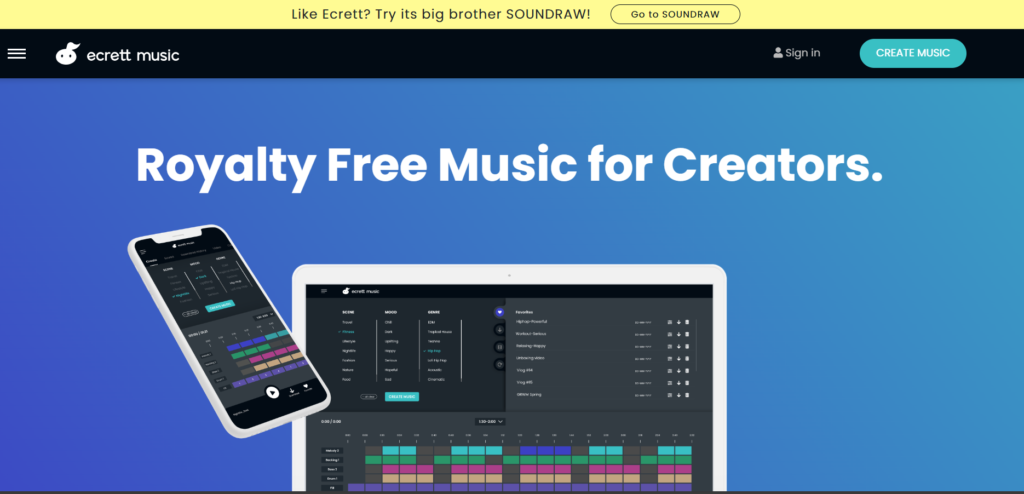
The Scene-Based System:
Instead of selecting abstract parameters like “mood” and “genre,” you choose:
- Scene: Where does this music play? (e.g., “Travel,” “Gaming,” “Vlog,” “Commercial”)
- Mood: What emotion do you want? (e.g., “Happy,” “Dramatic,” “Calm”)
- Genre: What style? (e.g., “Pop,” “Rock,” “Electronic,” “Cinematic”)
The AI then generates music specifically designed for that context.
Simplicity Focus:
Ecrett prioritizes ease of use over deep customization. You get three variations per generation, download your favorite, and move on. The entire process takes under 60 seconds.
Testing Experience:
Creating music for a product review video, selecting “Commercial” + “Energetic” + “Electronic” produced three upbeat tracks perfect for tech reviews. The music had professional production quality, appropriate energy levels, and no copyright concerns.
Strengths:
- Extremely simple interface
- Fast generation (under 60 seconds)
- Good quality for the ease of use
- Affordable pricing
- Commercial license included
- No musical knowledge required
Limitations:
- Limited customization options
- Less control over specific elements
- Smaller music library than competitors
- Basic editing capabilities
- Fewer genre options
Pricing: Free: Limited downloads, personal use. Individual: $9.99/month (commercial use, unlimited downloads). Business: $29.99/month (additional features, team access).
Official Site: https://ecrettmusic.com
Boomy: Instant Song Creation for Non-Musicians
Boomy has carved out a unique niche among AI music generation tools by enabling anyone to create complete songs—including vocals—in minutes, regardless of musical ability.
The Approach:
Boomy focuses on song creation rather than background music. You select a style, the AI generates a complete song with:
- Instrumental arrangement
- Vocal melodies (AI-generated or your voice)
- Song structure (verse, chorus, bridge)
- Professional mixing and mastering
Unique Features:
Vocal Integration Unlike most AI music tools, Boomy can generate AI vocals or help you record your own voice over the instrumental.
Distribution Boomy can distribute your songs to Spotify, Apple Music, and other platforms, potentially generating royalty income.
Monetization You retain rights to songs you create and can monetize them on streaming platforms.
Real-World Application:
A content creator used Boomy to generate intro/outro music for a podcast series. The AI created a catchy 30-second theme song with vocals stating the podcast name. The creator then used the same style to generate background music for episodes, maintaining audio branding consistency.
Strengths:
- Complete song creation (not just instrumentals)
- Vocal generation capabilities
- Distribution to streaming platforms
- Very fast creation process
- No musical skills required
- Potential for royalty income
Limitations:
- Less suitable for background/video music
- Vocal quality varies
- Less customization than professional tools
- Focused on pop/electronic genres
- Ownership terms can be complex
Pricing: Free: Limited creations, Boomy owns rights. Pro: $9.99/month (you own rights, unlimited creations). Premium: $19.99/month (additional features, distribution).
Official Site: https://boomy.com

Soundful: Studio-Quality Tracks in Minutes
Soundful positions itself as a premium option among AI music generation tools, emphasizing studio-quality production and professional licensing for content creators and businesses.
Quality Focus:
Soundful differentiates through:
- High-fidelity audio production
- Professional mixing and mastering
- Genre-specific AI models trained by music producers
- Customizable templates created by industry professionals
- Stem separation (individual instrument tracks)
The Workflow:
- Choose a genre template (created by professional producers)
- Adjust parameters (tempo, key, mood)
- Generate multiple variations
- Customize using the built-in editor
- Download in high-quality formats (WAV, MP3)
Professional Application:
A digital marketing agency producing video ads for multiple clients used Soundful to create consistent, high-quality audio branding. The stem separation feature allowed the agency to adjust individual elements (reduce drums for voiceover sections, boost bass for impact moments), achieving professional results without hiring audio engineers.
Strengths:
- Exceptional audio quality
- Professional producer-created templates
- Stem separation for advanced editing
- Commercial licensing included
- Good variety of genres
- Intuitive customization tools
Limitations:
- Higher price point
- Less suitable for complete beginners
- Requires decent internet connection
- Limited free tier
Pricing: Free: Limited downloads, watermark. Creator: $29.99/month (commercial use, unlimited downloads). Pro: $89.99/month (stem downloads, priority support).
Official Site: https://soundful.com

Comparative Analysis: Choosing Your Platform
Selecting the right AI music generation tools depends on your specific needs, budget, and technical capabilities. Here is how they compare across critical dimensions:
Best for Video Creators
Winner: Soundraw Unmatched customization for matching music to video pacing and mood.
Best for Cinematic Content
Winner: AIVA Exceptional emotional depth and orchestral quality for films and documentaries.
Best for Live Streaming
Winner: Mubert Infinite, adaptive music perfect for long-form live content.
Best for Simplicity
Winner: Ecrett Music Scene-based approach requires zero musical knowledge.
Best for Complete Songs
Winner: Boomy Only platform offering vocal generation and distribution.
Best for Enterprise
Winner: Amper Music (Shutterstock) Professional-grade tools with API and custom training.
Best Value
Winner: Soundful Professional quality at accessible pricing for serious creators.
Feature Comparison Matrix
| Platform | Ease of Use | Quality | Customization | Price | Best For |
|---|---|---|---|---|---|
| Soundraw | Easy | High | Very High | $$ | Video creators |
| AIVA | Medium | Very High | High | $$ | Cinematic content |
| Amper | Complex | Very High | Very High | $$ | Enterprise |
| Mubert | Easy | High | Low | $ | Live streaming |
| Ecrett | Very Easy | Good | Low | $ | Beginners |
| Boomy | Very Easy | Good | Medium | $ | Song creation |
| Soundful | Medium | Very High | High | $ | Professional quality |
Legal Considerations: Royalty-Free vs. Copyright-Free
Understanding licensing is crucial when using AI music generation tools. Many creators confuse “royalty-free” with “copyright-free,” leading to legal complications.
Royalty-Free Music:
- You pay once (or subscribe) and can use the music without ongoing royalty payments
- The creator/AI platform retains copyright
- You receive a license for commercial use
- Restrictions may apply (e.g., cannot resell the music as-is)
Copyright-Free Music:
- No copyright protection exists
- Anyone can use, modify, and distribute freely
- Rare for AI-generated music
- Usually applies to very old compositions (public domain)
What You Get with AI Music Platforms:
Most AI music generation tools provide:
- Commercial use license with paid subscription
- Royalty-free usage (no additional payments per use)
- Rights to monetize content featuring the music
- Restrictions on redistributing the raw music files
Important Considerations:
- Platform Ownership: Some platforms (like Boomy’s free tier) retain ownership of generated music. Always read terms carefully.
- Exclusivity: AI-generated music is not exclusive to you. Others can generate similar tracks using the same platform.
- YouTube Content ID: Some platforms register their music with Content ID. Ensure your license protects against claims.
- Attribution Requirements: Free tiers often require crediting the platform. Paid tiers typically waive this requirement.
- Broadcast and Film: Some licenses exclude theatrical releases or broadcast TV. Verify coverage for your use case.
Implementation Strategy: From Concept to Published Track
Deploying AI music generation tools effectively requires more than selecting a platform. You need a systematic approach that ensures quality and consistency.
Phase 1: Define Your Audio Brand (Week 1)
- Identify your content’s emotional tone
- Select 2-3 primary genres that match your brand
- Create a mood board with reference tracks
- Document tempo preferences (BPM range)
- Establish instrumentation guidelines
Phase 2: Platform Selection and Testing (Week 2)
- Choose 2 platforms based on your needs
- Generate test tracks for different content types
- Evaluate quality, customization, and ease of use
- Test licensing terms and download formats
- Select primary platform based on results
Phase 3: Template Development (Week 3)
- Create saved presets for common content types
- Document successful parameter combinations
- Build a library of go-to moods and genres
- Establish quality control checklist
- Train team members on brand guidelines
Phase 4: Production Workflow (Ongoing)
- Generate music 2-3 days before content publication
- Review and adjust tracks for pacing and mood
- Ensure proper audio levels (music doesn’t overpower voice)
- Export in appropriate format (WAV for quality, MP3 for web)
- Archive successful tracks for reuse
Key Principle: AI generates the music; human judgment ensures it serves your content. Always review tracks in context with your actual content before publishing.
Common Mistakes That Undermine Audio Quality
Even the best AI music generation tools can produce disappointing results if you make these critical errors:
1. Ignoring Audio Levels Music that overpowers voiceover or dialogue ruins content. Keep background music at -20 to -25 dB for speech-heavy content, -15 to -20 dB for music-focused pieces.
2. Mismatched Energy High-energy music under a contemplative monologue creates cognitive dissonance. Match music energy to content emotion and pacing.
3. Overusing the Same Track Using identical music across multiple videos creates brand fatigue. Generate variations or rotate between 3-5 tracks to maintain freshness.
4. Neglecting Transitions Abrupt music starts and stops jar viewers. Use fade-ins (2-3 seconds) and fade-outs (3-5 seconds) for smooth transitions.
5. Wrong Genre for Audience Classical music for a gaming channel or heavy metal for a meditation app alienates audiences. Know your demographic’s musical preferences.
6. Skipping Quality Checks Always listen to music on multiple devices (headphones, phone speakers, laptop) before publishing. What sounds good on studio monitors may sound tinny on phone speakers.
7. Copyright Complacency Assuming all AI music is copyright-free leads to claims. Always verify licensing terms and maintain records of your subscriptions and downloads.
The Future of AI-Generated Music
AI music generation tools continue evolving rapidly. Emerging trends include:
Adaptive Music Systems Music that responds in real-time to viewer engagement, adjusting energy and mood based on audience reactions and content pacing.
Voice Cloning Integration AI that can clone your voice or create custom vocalists, enabling personalized theme songs and audio branding without hiring singers.
Emotion Recognition Platforms that analyze your video content’s emotional arc and automatically generate music that mirrors and enhances those emotions.
Collaborative AI Tools that learn from your feedback and editing patterns, becoming increasingly aligned with your creative vision over time.
Blockchain Licensing Decentralized rights management ensuring transparent ownership and fair compensation as AI music becomes indistinguishable from human composition.
The creators who thrive will be those who view AI not as a replacement for human creativity, but as a tool that amplifies their ability to tell compelling stories through the powerful combination of visuals and sound.
Frequently Asked Questions
Can I monetize content with AI-generated music?
Yes, with paid subscriptions to legitimate AI music generation tools. Most platforms grant commercial use licenses that allow monetization on YouTube, podcasts, social media, and even broadcast media. Always verify the specific license terms before publishing.
Will AI music trigger YouTube Content ID claims?
Reputable platforms register their music libraries to prevent false claims. However, always keep records of your subscriptions and downloads. If you receive a claim, you can dispute it with your license documentation. Free tiers sometimes have Content ID registration, so paid plans are safer for monetization.
How does AI music quality compare to human composers?
For background music, modern AI often matches or exceeds mid-tier human composers. For emotionally complex, narrative-driven compositions, human composers still excel. The gap is narrowing rapidly, with AI now producing music that passes blind tests for many listeners.
Do I need musical knowledge to use these tools?
No. AI music generation tools are specifically designed for non-musicians. You select mood, genre, and tempo through simple interfaces, and the AI handles composition, arrangement, and production. Musical knowledge helps with fine-tuning but is not required.
Can I edit AI-generated music?
Most platforms offer basic editing: adjusting tempo, changing key, modifying instrument levels, and trimming length. Advanced tools like Soundraw and Soundful provide stem separation, allowing you to adjust individual instruments. For complex edits, export to DAW software like Audacity or GarageBand.
Is AI music truly original or just sampled loops?
Quality platforms use neural networks to generate original compositions note-by-note, not just assemble pre-recorded loops. However, some tools combine AI composition with high-quality sample libraries for realistic instrumentation. The result is original music that sounds professionally produced.
What file formats do AI music tools provide?
Common formats include:
- MP3 (compressed, good for web)
- WAV (uncompressed, highest quality)
- FLAC (lossless compression)
- Stems (individual instrument tracks, premium platforms)
For professional use, always download WAV or lossless formats when available.
Can I use AI music for client work?
Yes, with appropriate commercial licenses. Most paid plans allow use in client projects, but verify:
- Number of allowed projects
- Distribution limits (broadcast, theatrical)
- Whether clients need their own license
- Attribution requirements
When in doubt, upgrade to business/enterprise plans for broader usage rights.
How long does it take to generate music?
Typical generation time:
- Simple tracks: 10-30 seconds
- Complex compositions: 1-3 minutes
- Custom edits: Additional 30-60 seconds
This is dramatically faster than hiring human composers (days to weeks) or searching stock libraries (30-60 minutes per track).
What if I am not satisfied with the generated music?
Most platforms allow unlimited regeneration until you find a track you like. You can:
- Adjust parameters and regenerate
- Try different moods or genres
- Use reference tracks for guidance
- Contact support for assistance
- Request refunds if consistently unsatisfied (check platform policies)
The iterative nature of AI generation means you can create dozens of variations quickly until finding the perfect match.