
AI website builders have dismantled the traditional barrier between concept and live publication. What once required hiring developers, managing hosting environments, and writing structural code now happens through conversational interfaces that generate complete, responsive sites in minutes. The technology has matured beyond simple template swapping. Modern systems understand information architecture, conversion psychology, and responsive design principles, translating plain-language prompts into functional digital properties.
If you have ever delayed a product launch because of development bottlenecks, or watched budgets drain while waiting for basic landing pages, this shift changes everything. You no longer trade speed for quality. You can deploy polished, SEO-ready properties while maintaining full control over branding, content, and user flow.
This analysis moves beyond feature lists. It examines how generation engines actually function, where they excel, where they fall short, and how to select platforms based on your specific operational needs. The goal is not just building a site. It is launching a sustainable digital asset that scales with your business.
- The Structural Shift: Why Code Is No Longer the Gatekeeper
- How Modern Generation Engines Actually Operate
- Rapid Deployment: AI Website Builders for Landing Pages and MVPs
- Enterprise Architecture: Platforms for Full-Scale Business Sites
- Dynamic Commerce: AI Website Builders for E-Commerce Workflows
- Ownership, Export Rights, and Platform Lock-In
- Migration Pathways and Scaling Realities
- Security, Compliance, and Performance Benchmarks
- Decision Matrix: Matching Tools to Your Workflow
- Implementation Traps That Delay Launch
- The Next Evolution: Autonomous Web Agents
- Frequently Asked Questions
The Structural Shift: Why Code Is No Longer the Gatekeeper
Traditional web development followed a linear, resource-heavy sequence. Wireframes moved to design mockups. Mockups translated into HTML/CSS. Developers integrated JavaScript frameworks, configured servers, and deployed builds. Each handoff introduced friction, version conflicts, and timeline delays. A simple brochure site routinely consumed three to six weeks.
AI website builders compress this workflow into a single continuous loop. You describe your objective. The system generates layout, writes copy, selects imagery, configures navigation, and publishes a live URL. Revisions happen through conversation rather than code commits. The technology does not replace strategic thinking. It removes execution friction.
The business impact extends beyond speed. It democratizes digital presence. Solopreneurs, educators, local service providers, and internal corporate teams can now launch properties that previously required dedicated engineering budgets. The constraint shifts from technical capability to strategic clarity. Your prompt quality determines your output quality.
How Modern Generation Engines Actually Operate
Understanding the underlying mechanics helps you set realistic expectations and avoid platform limitations.
Prompt-to-Structure Translation Natural language models parse your description, extract intent, and map it to component libraries. They recognize industry conventions, select appropriate typography hierarchies, and arrange sections based on conversion best practices.
Asset Synthesis Rather than pulling from static stock libraries, many systems generate custom imagery, icons, and illustrations on demand. They match visual tone to your brand keywords, ensuring cohesive aesthetics without manual curation.
Responsive Logic Generation engines apply fluid grid systems automatically. They test breakpoints, adjust font scaling, and restructure navigation for mobile, tablet, and desktop viewports. You receive a unified codebase rather than separate mobile templates.
SEO Foundation Leading platforms inject semantic HTML, generate meta tags, create XML sitemaps, and configure Open Graph data during build. They do not just make sites look good. They make them crawlable.
The technology is powerful, but it is not magic. It excels at structure, consistency, and speed. It still requires human direction for brand nuance, complex integrations, and advanced functionality.
Rapid Deployment: AI Website Builders for Landing Pages and MVPs
Not every project requires a full corporate architecture. Many initiatives need fast validation, lead capture, or product testing. This is where generation speed delivers immediate ROI.
Framer AI operates as a design-first engine that translates text prompts into interactive, high-fidelity pages. It excels at SaaS landing pages, portfolio sites, and campaign microsites. The system generates responsive layouts, applies modern animation libraries, and allows granular visual control without touching code. You can publish directly through Framer or export clean HTML for external hosting.
site:https://www.framer.com/ai/
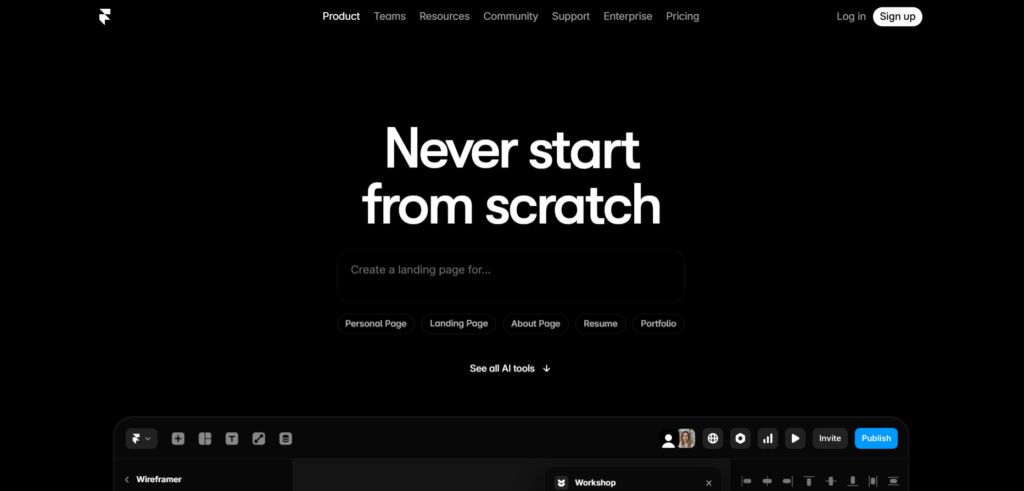
Use Case Reality: A startup founder needed to validate a B2B software concept before building the actual product. Using Framer AI, they generated a conversion-optimized landing page, integrated a waitlist form, and launched within four hours. The page collected 300 qualified leads in two weeks, validating demand before engineering resources were allocated.
Strengths in this category:
- Publish-ready in under one hour
- High visual fidelity and modern aesthetics
- Built-in hosting and SSL configuration
- Easy A/B testing for headline and layout variations
Limitations to acknowledge:
- Limited backend functionality
- Not suited for complex user accounts or databases
- Scaling beyond single-page flows requires platform migration
“Once your site is live, you’ll need compelling visuals to complete your brand identity. Our guide on AI logo makers shows you how to generate professional logos that match your new website’s design in minutes.”
Enterprise Architecture: Platforms for Full-Scale Business Sites
When your project demands multiple service pages, team directories, blog structures, and integrated CRM connections, you need structural intelligence rather than just visual generation.
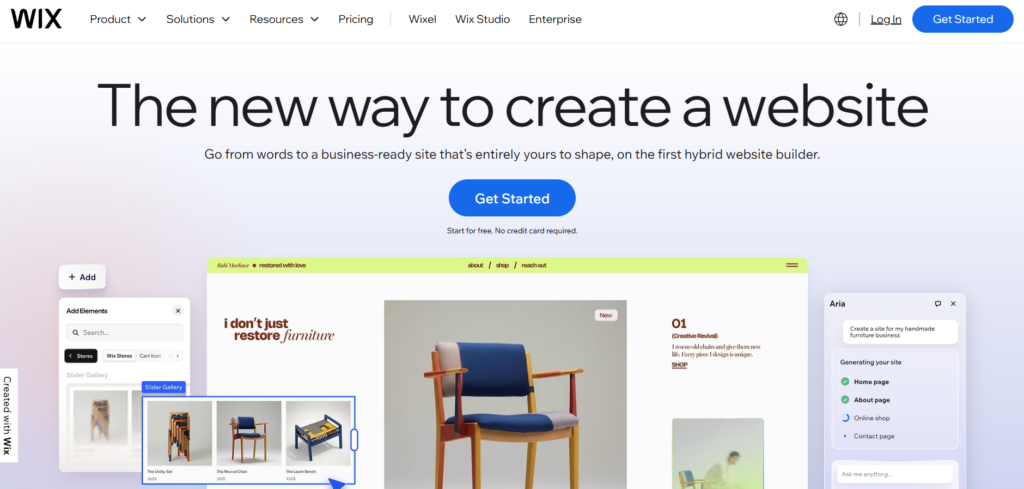
Wix ADI (Artificial Design Intelligence) has evolved from a basic template filler into a contextual architecture engine. It asks targeted questions about your industry, goals, and content preferences, then generates multi-page sites with logical navigation, contact forms, booking systems, and blog frameworks. The AI learns from your edits, suggesting layout improvements and content expansions as you refine.
Site:https://www.wix.com/
Squarespace Blueprint AI takes a similar approach but emphasizes brand consistency and content density. It generates comprehensive site maps, applies cohesive design systems, and structures pages for long-form readability. The platform excels at professional services, creative agencies, and educational organizations that require polished, information-rich properties.
Site:https://www.squarespace.com/

Implementation Workflow:
- Input business type, target audience, and primary objectives
- Review generated site map and adjust page hierarchy
- Customize brand colors, typography, and imagery tone
- Populate AI-drafted copy with verified facts and unique value propositions
- Configure integrations (analytics, email marketing, scheduling)
- Publish and connect custom domain
Strengths in this category:
- Multi-page architecture with logical navigation
- Built-in CMS for blogs and resource libraries
- Native integrations for bookings, payments, and memberships
- Ongoing AI suggestions for content expansion
Limitations to acknowledge:
- Less granular control over custom code injection
- Platform hosting required for full feature access
- Advanced e-commerce features may require tier upgrades
Dynamic Commerce: AI Website Builders for E-Commerce Workflows
Selling products introduces complexity: inventory management, tax calculation, shipping rules, payment gateways, and conversion optimization. General-purpose builders often stumble here. Commerce-specific engines handle it natively.
Shopify Magic embeds AI directly into the store creation and management workflow. It generates product descriptions, creates collection layouts, optimizes checkout flows, and suggests pricing strategies based on market data. The system does not just build the storefront. It operates as a continuous optimization engine.
Site:https://www.shopify.com/ai

Hostinger AI Builder targets small to mid-sized merchants who need speed without sacrificing functionality. It generates complete stores with product grids, review sections, FAQ blocks, and trust badges. The AI configures payment processors, sets up shipping zones, and creates mobile-optimized checkout experiences automatically.
Site:https://www.hostinger.com/ai-website-builder
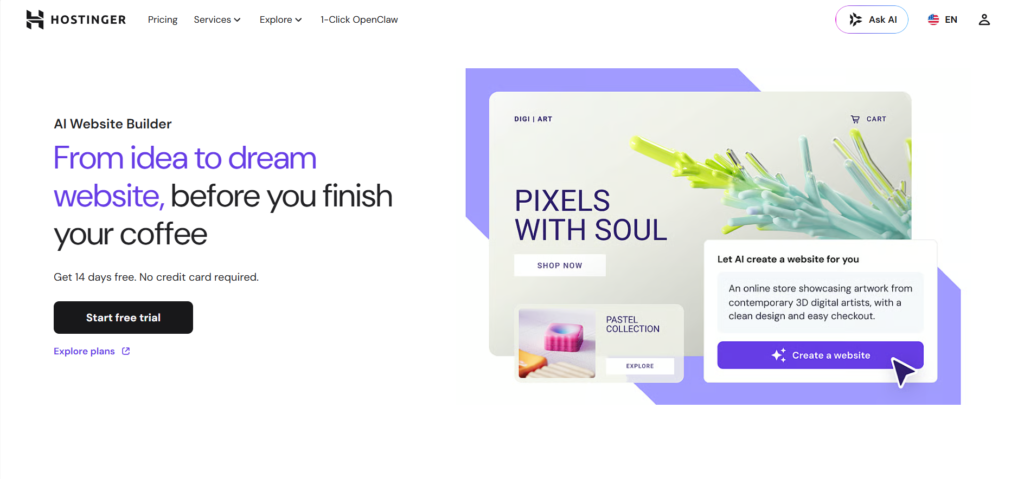
Operational Reality: A boutique apparel brand migrated from a manual WordPress setup to Hostinger AI. The system generated 40 product pages, configured size variants, integrated Stripe and PayPal, and launched a responsive storefront in one afternoon. Conversion rates increased 18% due to faster load times and cleaner mobile checkout flows.
Strengths in this category:
- Native payment and shipping configuration
- Inventory and variant management built-in
- Conversion-focused layout generation
- Automatic tax and compliance handling
Limitations to acknowledge:
- Platform transaction fees may apply
- Less flexibility for highly custom checkout experiences
- Scaling to enterprise volume may require platform migration
Ownership, Export Rights, and Platform Lock-In
One critical factor separates professional AI website builders from casual site generators: who owns the output, and can you leave?
Code Export Capabilities Some platforms allow full HTML/CSS export. You can host the files anywhere, modify them freely, and avoid vendor dependency. Others restrict export, keeping your site within their ecosystem. This distinction determines your long-term flexibility.
Content Portability Even if code export is limited, your text, images, and product data should remain accessible. Leading platforms provide CSV exports, RSS feeds, and API access so you can migrate content if needed.
Domain and Brand Control Ensure you can connect custom domains, configure DNS records, and maintain brand consistency without platform watermarks. Free tiers often restrict these features. Paid plans typically unlock full ownership rights.
Strategic Recommendation: If your project has long-term growth potential, prioritize platforms that offer code export or clear data portability. Treat the builder as a launch accelerator, not a permanent cage. You can always migrate later, but starting with export rights preserves your options.
Migration Pathways and Scaling Realities
Every successful site eventually outgrows its initial builder. Planning for migration prevents costly rebuilds later.
When to Consider Migration
- You require custom database relationships
- You need advanced user authentication or role management
- Your traffic exceeds platform performance thresholds
- You require specific third-party API integrations not supported natively
Migration Strategy
- Export all content, media, and product data
- Document URL structures to preserve SEO equity
- Implement 301 redirects for any slug changes
- Rebuild core pages on the new platform
- Test functionality thoroughly before switching DNS
- Monitor analytics for traffic drops or broken links
Scaling Best Practices
- Keep content modular so sections can be reused across platforms
- Avoid platform-specific shortcodes that break during export
- Maintain a style guide separate from the builder’s theme settings
- Document all integrations and automation workflows for handoff
Migration is not failure. It is progression. Starting with an AI builder accelerates validation. Migrating later enables specialization.
Security, Compliance, and Performance Benchmarks
Speed of launch means nothing if the site compromises user safety or violates regulations.
SSL and Data Encryption All reputable AI website builders provide automatic HTTPS configuration. Verify that certificates renew automatically and that mixed content warnings do not appear.
GDPR and CCPA Compliance Ensure the platform offers cookie consent banners, data processing agreements, and user rights management. E-commerce sites must handle payment data through PCI-compliant gateways, never storing card information directly.
Performance Metrics Aim for Core Web Vitals that meet Google’s thresholds:
- Largest Contentful Paint (LCP): Under 2.5 seconds
- First Input Delay (FID): Under 100 milliseconds
- Cumulative Layout Shift (CLS): Under 0.1
AI-generated sites often load quickly because they use optimized asset delivery and minimal custom scripts. However, heavy imagery or unoptimized animations can degrade performance. Always run speed tests before launch.
Accessibility Standards Verify that generated sites meet WCAG 2.1 AA guidelines: proper heading hierarchy, alt text for images, keyboard navigation support, and sufficient color contrast. Many platforms now include accessibility audits during the build process.
Decision Matrix: Matching Tools to Your Workflow
Not every project requires the same engine. Select based on your primary objective, technical comfort, and growth trajectory.
| Primary Need | Recommended Platform Type | Key Strength | Migration Path |
|---|---|---|---|
| Landing page or MVP | Framer AI, Dora | Speed and visual fidelity | Export HTML or rebuild later |
| Professional services site | Wix ADI, Squarespace Blueprint | Multi-page architecture and CMS | Native scaling or content export |
| Product commerce | Shopify Magic, Hostinger AI | Native checkout and inventory | Platform upgrade or headless migration |
| Portfolio or creative showcase | Dora, Framer AI | Interactive and immersive layouts | Static export or frame-based migration |
| Internal corporate site | Wix ADI, Squarespace Blueprint | Governance and team collaboration | Enterprise CMS migration |
Evaluation Checklist:
- Does the platform generate your required page types?
- Can you connect a custom domain without restrictions?
- Does it provide SEO fundamentals automatically?
- Are integrations native or dependent on third-party plugins?
- Can you export code or data if you outgrow the platform?
- Does pricing scale reasonably with traffic and features?
Test with a real project, not a demo. Generate a complete site, publish it, and measure load speed, mobile responsiveness, and editing flexibility before committing.
Implementation Traps That Delay Launch
Even intelligent platforms fail when deployed without strategy. Avoid these common errors:
1. Over-Promising in the Initial Prompt Asking for “a modern e-commerce site with membership tiers, AI chat, and real-time inventory” in one prompt produces cluttered, unfocused output. Start with core structure. Add complexity iteratively.
2. Accepting AI Copy Without Verification Generated text sounds professional but may contain inaccuracies, generic claims, or tone mismatches. Always fact-check, insert unique value propositions, and align voice with your brand guidelines.
3. Ignoring Mobile Testing Desktop previews look polished. Mobile viewports reveal navigation breaks, font scaling issues, and button misalignment. Test on actual devices, not just browser simulators.
4. Skipping SEO Configuration AI sets basic meta tags, but you must customize title tags, write unique descriptions, configure canonical URLs, and submit sitemaps to search consoles. Automation handles foundation. Human oversight handles optimization.
5. Forgetting Analytics and Tracking Publishing without analytics is launching blind. Install GA4, configure conversion events, set up heatmaps, and monitor user behavior from day one. Data informs iteration.
6. Assuming Set-and-Forget Maintenance AI builds the initial version. Ongoing success requires content updates, security patches, performance monitoring, and user feedback integration. Treat your site as a living product, not a static brochure.
The Next Evolution: Autonomous Web Agents
AI website builders are transitioning from prompt-to-page generators to autonomous digital workers. Emerging systems do not just build sites. They monitor performance, run A/B tests, update content based on analytics, fix broken links, and optimize conversion paths without human intervention.
Current Trajectory:
- Multi-agent workflows where one AI handles design, another manages SEO, and a third optimizes conversion
- Natural language maintenance: “Update the pricing page to reflect the new enterprise tier and add a comparison table”
- Predictive layout adjustments based on real-time user behavior heatmaps
- Self-healing code that detects JavaScript errors or broken integrations and applies patches automatically
Implications for Teams: The role of web managers will shift from builders to strategists. Technical execution will be automated. Human focus will move to brand positioning, user experience psychology, and ethical oversight. Organizations that adopt these systems early will compress launch cycles from weeks to hours. Organizations that resist will face mounting maintenance overhead and slower iteration speeds.
Frequently Asked Questions
Can AI website builders replace professional developers?
For standard business sites, landing pages, portfolios, and small e-commerce stores, yes. The output is production-ready, responsive, and SEO-optimized. For highly custom applications, complex database relationships, or proprietary software integrations, developers remain essential. AI handles structure and speed. Humans handle complexity and innovation.
Are AI-generated sites good for SEO?
Yes, when configured correctly. Leading AI website builders generate semantic HTML, create XML sitemaps, optimize image alt text, and configure meta tags automatically. However, you must customize title tags, write unique content, build internal links, and submit sitemaps to search consoles. Automation provides foundation. Human strategy provides ranking power.
What happens if I want to leave the platform later?
It depends on export rights. Some platforms allow full HTML/CSS export, letting you host files anywhere. Others restrict export but provide content CSVs and media libraries for migration. Always verify data portability before committing. Starting with export-friendly platforms preserves long-term flexibility.
Do AI builders support custom domains and email?
Yes. Paid plans universally support custom domain connections, DNS configuration, and professional email setup. Free tiers typically restrict domains to platform subdomains. For business use, upgrade to a paid plan immediately to maintain brand consistency and email deliverability.
How secure are AI-generated websites?
Reputable platforms provide automatic SSL certificates, DDoS protection, regular security patches, and PCI-compliant payment processing for commerce sites. You remain responsible for strong passwords, two-factor authentication, and keeping integrations updated. The platform handles infrastructure security. You handle access security.
Can I use AI website builders for client projects?
Absolutely. Many agencies use them to accelerate delivery, reduce development costs, and increase profit margins. Ensure your contract specifies platform ownership, migration rights, and ongoing maintenance responsibilities. Transparency with clients about tool usage builds trust and sets clear expectations.
What is the learning curve for non-technical users?
Most platforms require zero coding knowledge. You type descriptions, select preferences, and review outputs. Editing happens through visual interfaces or conversational prompts. The real skill is prompt clarity and strategic planning. If you can write a clear project brief, you can operate these systems effectively.
How do AI builders handle accessibility compliance?
Leading platforms generate sites that meet WCAG 2.1 AA standards: proper heading structure, keyboard navigation, sufficient color contrast, and image alt text. Some include built-in accessibility audits that flag violations before publication. Always verify compliance with third-party tools if your industry requires strict adherence.